JavaScript has a type system. It’s just not always obvious what it’s doing.
Variables don’t declare their type. Values get converted silently. Objects behave differently from numbers in ways that look subtle until they bite you in production.
Let’s go through all of it — the primitives, the gotchas, pass by value versus reference, coercion, and why TypeScript exists.
Primitive types
JavaScript has seven primitive types:
numberstringbooleanundefinednullsymbolbigint
Everything else is an object. That’s not seven out of hundreds — that’s the entire list. There’s only one non-primitive type: object.
let age = 25; // number
let name = "Dhaivick"; // string
let active = true; // boolean
let x; // undefined
let empty = null; // null
let id = Symbol("id"); // symbol
let big = 9007199254740993n; // bigint
Primitive types are simple values. They don’t have methods. They don’t have properties. They sit in memory as plain values.
The typeof operator
Want to check what type a value is? Use typeof.
typeof 42; // "number"
typeof "hello"; // "string"
typeof true; // "boolean"
typeof undefined; // "undefined"
typeof Symbol(); // "symbol"
typeof {}; // "object"
typeof []; // "object"
typeof function () {}; // "function"
Notice something? typeof [] returns "object" — not "array". We’ll come back to that.
The typeof null bug
Here’s one of the most famous bugs in all of JavaScript:
typeof null; // "object"
null is a primitive type. It should return "null". Instead it returns "object".
Why? When JavaScript was first written in ten days, each value in memory was stored with a type tag. Objects had a type tag of 0. null was represented as a null pointer — also 0. So when typeof checked the tag, null looked like an object.
Brendan Eich — the person who created JavaScript — has acknowledged this is a bug. But it can never be fixed. Too much code in the wild relies on typeof null === "object" to not break if you change it. So it stays. Forever.
undefined vs null
Two types that represent “nothing” — but they’re not the same.
undefinedmeans a variable was declared but never assigned a value. The JavaScript engine set it. You didn’t.nullmeans you, the developer, intentionally set something to have no value.
let a; // undefined — the engine set this
let b = null; // null — you explicitly said "no value here"
Think of it this way: undefined is absence of definition. null is deliberate absence of value.
Arrays and functions are objects
This trips up a lot of people.
typeof []; // "object"
typeof function () {}; // "function"
Arrays are objects. Under the hood, an array like [1, 2, 3] is basically this:
{
  0: 1,
  1: 2,
  2: 3
}
Numeric indices are just object keys. That’s why typeof [] returns "object".
Functions are technically objects too — they’re callable objects. typeof returns "function" for them as a special case, but they’re still objects.
So how do you actually check if something is an array? Use Array.isArray():
Array.isArray([1, 2, 3]); // true
Array.isArray({ a: 1 }); // false
If you rely on typeof, you’ll get "object" for both arrays and plain objects. Array.isArray is the correct tool.
Built-in objects
JavaScript ships with a bunch of built-in objects you get for free:
Number, String, Boolean, Math, Date, Error, Symbol, RegExp, JSON, Promise…
typeof Math; // "object"
typeof Infinity; // "number"
Math.max(1, 2, 3); // 3
new Date().toISOString(); // "2026-05-26T..."
These are tools. Math is just an object with useful methods on it. Date gives you date manipulation. Error gives you a constructor for errors you can throw.
Why primitives have methods
Here’s something that should be confusing:
true.toString(); // "true"
"hello"
  .toUpperCase()(
    // "HELLO"
    3.14159,
  )
  .toFixed(2); // "3.14"
Primitives don’t have methods. So how does this work?
When you try to access a property on a primitive, JavaScript silently wraps it in an object. It creates a temporary Boolean, String, or Number wrapper object just long enough to give you access to the method — then throws it away.
// what actually happens behind the scenes:
true.toString();
// → new Boolean(true).toString() → "true"
That’s why String, Boolean, Number exist as built-in objects — not because you’d use them directly, but so primitives can borrow their methods.
Pass by value vs pass by reference
This is where JavaScript’s type system starts to really matter.
Primitives are passed by value. When you assign a primitive to another variable, you get a copy. Completely independent.
let a = 5;
let b = a; // copy of 5

b++;

console.log(a); // 5 — unchanged
console.log(b); // 6
Objects are passed by reference. When you assign an object to another variable, you don’t get a copy — you get a reference to the same place in memory.
let obj1 = { name: "Dhaivick", password: "123" };
let obj2 = obj1; // same reference, not a copy

obj2.password = "hacked";

console.log(obj1.password); // "hacked"
console.log(obj2.password); // "hacked"
Both variables point to the same object. Change it through one, and the other sees the change too.
Here’s a memory diagram to make this concrete:
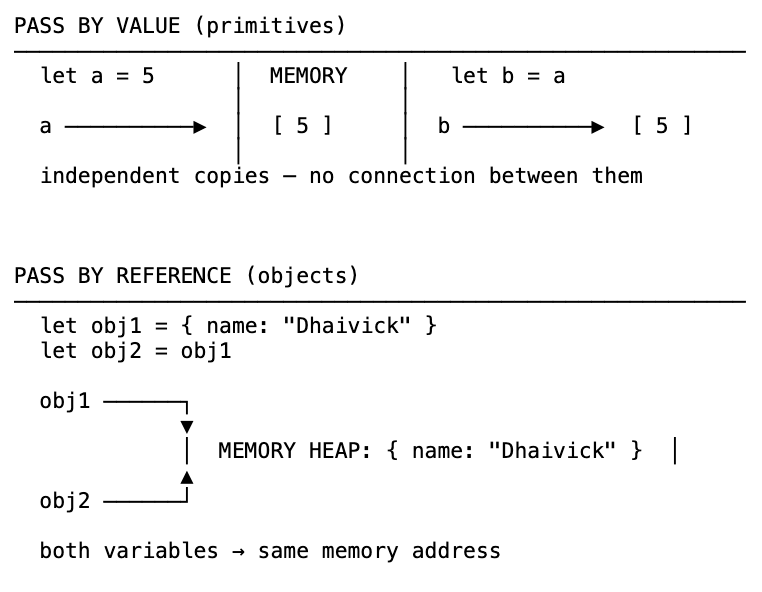
This is intentional. Copying a 10MB object every time you assign it would be catastrophic. References save memory. Just know what you’re working with.
Shallow cloning vs deep cloning
If you want a copy of an object — not a reference — you need to explicitly clone it.
Shallow clone copies the first level of properties:
const original = { a: 1, b: 2 };

// Option 1: Object.assign
const clone1 = Object.assign({}, original);

// Option 2: spread operator (cleaner)
const clone2 = { ...original };

clone2.a = 999;
console.log(original.a); // 1 — untouched
But shallow cloning only goes one level deep. If your object has nested objects, those inner objects are still shared by reference:
const original = { a: 1, nested: { deep: "try and copy me" } };
const clone = { ...original };

clone.nested.deep = "got you";

console.log(original.nested.deep); // "got you" — still affected
The outer object was cloned. The inner object wasn’t. This is a shallow clone.
Deep clone copies everything, including nested objects:
// The classic trick (has limitations with functions, Dates, etc.)
const deepClone = JSON.parse(JSON.stringify(original));

// The modern way — structuredClone (built into modern browsers and Node)
const superClone = structuredClone(original);
structuredClone() is the correct tool for deep cloning now. It handles more edge cases than the JSON trick and is a built-in browser API. The JSON approach is a workaround — use structuredClone instead.
One caveat: deep cloning large, deeply nested objects can be expensive. If you find yourself doing it often, rethink your data structure.
Type coercion
Type coercion is JavaScript silently converting one type to another when you compare or operate on mixed types.
1 == "1"; // true  (number coerced to string, then compared)
0 == false; // true  (false coerced to 0)
"" == false; // true
The == operator — double equals — allows this. It looks at two different types and tries to make them comparable by converting one of them.
The === operator — triple equals — doesn’t. It compares type and value both. No conversions.
1 === "1"; // false — different types
0 === false; // false — different types
Should you ever use ==? No. Use === always. Double equals can produce genuinely baffling results:
// These all evaluate to true with ==
false == "";
false == [];
0 == [];
"" == [];
"1" == [1];
That’s not clever flexibility — it’s a minefield. Stick to ===.
Coercion also shows up in conditionals:
if (1) {
  /* runs — 1 is truthy */
}
if (0) {
  /* doesn't run — 0 is falsy */
}
if ("") {
  /* falsy */
}
if ("hello") {
  /* truthy */
}
if (null) {
  /* falsy */
}
if (undefined) {
  /* falsy */
}
if ([]) {
  /* truthy — empty array is truthy! */
}
if ({}) {
  /* truthy — empty object is truthy! */
}
JavaScript is coercing your value into a boolean to evaluate the condition. Knowing your truthy/falsy values saves you a lot of confusion.
Object.is() — edge cases in equality
Triple equals handles almost everything. But there are two edge cases where it gives the wrong answer:
+0 === -0; // true  — but they're technically different
NaN === NaN; // false — NaN is not equal to itself
Object.is() gets these right:
Object.is(+0, -0); // false
Object.is(NaN, NaN); // true
You won’t hit this in most code. But it’s good to know why NaN === NaN fails and what to use when you need exact same-value equality.
Static vs dynamic typing
JavaScript is a dynamically typed language. You don’t declare what type a variable holds — the engine figures it out at runtime.
let a = 100; // number
let a = "hello"; // now a string — totally fine
let a = true; // now a boolean — still fine
A statically typed language makes you declare the type upfront:
// C++ — you must declare the type
int a = 100;
string name = "Dhaivick";
The type is locked in at compile time. Try to put a string where an int is expected — the code won’t compile.
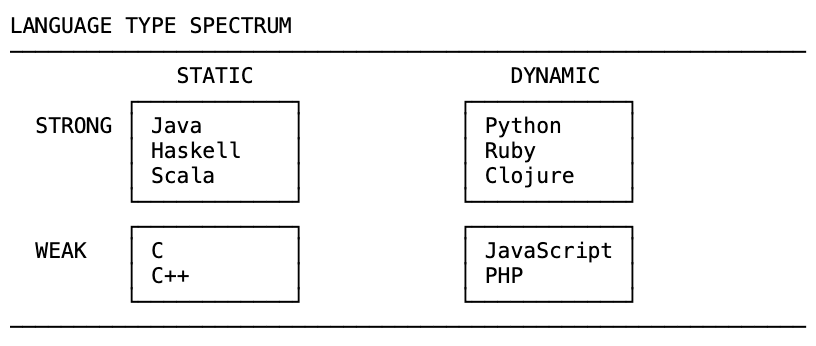
Pros of static typing:
- Self-documenting — function signatures tell you what types go in and come out
- Autocomplete and editor tooling works much better
- Bugs caught at compile time, before they reach production
Cons of static typing:
- More code to write, more complexity to manage
- Slower development cycle
- Some people treat it as a substitute for writing tests — it isn’t
Pros of dynamic typing:
- Faster to write, less ceremony
- You’re focused on logic, not type declarations
Cons of dynamic typing:
- Type errors surface at runtime — possibly in front of users
Strong vs weak typing — not the same thing
People often say “dynamically typed = weakly typed” and “statically typed = strongly typed.” That’s wrong.
These are two separate axes.
Weak typing means the language will silently convert types when you mix them:
// JavaScript — weakly typed
"booyah" + 17; // "booyah17" — number coerced to string, no error
Strong typing means the language refuses and throws an error:
# Python — strongly typed, but dynamically typed
"booyah" + 17  # TypeError: can only concatenate str (not "int") to str
Python is dynamically typed (no type declarations needed) but strongly typed (won’t silently convert). JavaScript is both dynamically typed and weakly typed — which is why type coercion exists in the first place.
TypeScript
TypeScript adds static typing to JavaScript. You write JavaScript, but with type annotations:
function sum(a: number, b: number): number {
  return a + b;
}

sum("hello", 5); // Error: Argument of type 'string' is not assignable to type 'number'
The TypeScript compiler catches this before the code ever runs. It’s still JavaScript under the hood — TypeScript compiles down to plain JS. It just adds a safety layer on top.
If you’re working on a larger codebase or a team project, TypeScript is worth it. The type errors you catch at compile time are far cheaper than the ones you catch in production.
The short version
- Seven primitive types, one non-primitive (object)
typeof null === "object"is a bug — it will never be fixedundefined= engine set it,null= you set it- Arrays and functions are objects
- Primitives are copied; objects are referenced
- Use
Object.assign, spread, orstructuredCloneto clone objects - Always use
===, never== - JavaScript is dynamically typed and weakly typed — TypeScript adds the static safety layer