Every program does two things: stores data and manipulates it.
The question is — how do you organise all that as your program grows? As more developers join? As features pile up?
That’s what programming paradigms are for. And object oriented programming is one of the most widely used answers to that question.
OOP says: keep your data and the behaviour that acts on it together, in one place, modelling real-world things as objects. Group related state and methods into a container. Make your code easy to reason about, extend, and maintain.
Let’s see how JavaScript gets there — from messy repetitive code, step by step, to clean class-based OOP.
A brief history
Programming didn’t start with nice abstractions.
It started with machine code — ones and zeros. Then assembly. Then early high-level languages like COBOL and BASIC. Everything was procedural: store data here, move it there, modify it, read it. No structure. Just a sequence of instructions.
As programs grew more complex through the 60s and 70s, programmers started asking: how do we organise this better?
Two answers emerged that are still dominant today:
- Object oriented programming — inspired by Smalltalk, popularised by C++, Java, and others
- Functional programming — rooted in Scheme and Lisp
JavaScript was built on both influences. Brendan Eich loved the functional side of Scheme but was under pressure to make JavaScript look appealing to Java developers. The result: a multi-paradigm language that does both.
And now we’re going to do OOP in it.
The game
To make this concrete, we’re building a fairy tale game. It has characters — elves, ogres, dragons. They have names, weapons, they can attack. Let’s see how we’d build this, starting from the most naive approach and improving it each time.
Step 1: Object literals (the naive start)
The obvious first attempt:
const elf1 = {
  name: "Orwell",
  weapon: "bow",
  attack() {
    return `attack with ${this.weapon}`;
  },
};

const elf2 = {
  name: "Sally",
  weapon: "bow",
  attack() {
    return `attack with ${this.weapon}`;
  },
};
This works. But the moment you need a third elf, you copy-paste again. A fourth — copy-paste. A hundredth? You’ve got the same attack method written in a hundred places. That’s not maintainable.
Step 2: Factory functions
A factory function is just a function that creates and returns objects.
function createElf(name, weapon) {
  return {
    name,
    weapon,
    attack() {
      return `attack with ${this.weapon}`;
    },
  };
}

const peter = createElf("Peter", "stones");
const sam = createElf("Sam", "fire");

peter.attack(); // "attack with stones"
sam.attack(); // "attack with fire"
Better — no more copy-pasting. But there’s a new problem.
Every time you call createElf, you get a new object with its own attack function in memory. A thousand elves means a thousand attack functions sitting in different memory locations doing the exact same thing. That’s wasteful.
Step 3: Object.create with a shared store
The fix: put shared methods in one place and link to them through the prototype chain.
const elfFunctions = {
  attack() {
    return `attack with ${this.weapon}`;
  },
};

function createElf(name, weapon) {
  const newElf = Object.create(elfFunctions); // prototype chain to elfFunctions
  newElf.name = name;
  newElf.weapon = weapon;
  return newElf;
}

const peter = createElf("Peter", "stones");
const sam = createElf("Sam", "fire");

peter.attack(); // works — found via prototype chain
Now attack lives in one place. Every elf points up the prototype chain to elfFunctions.attack. Memory efficient.
This is true prototypal inheritance. It’s the “pure” approach that some people prefer.
But — you won’t see it much in the wild. The community mostly moved to constructor functions and then ES6 classes.
Step 4: Constructor functions
Constructor functions were the standard before classes arrived.
function Elf(name, weapon) {
  this.name = name;
  this.weapon = weapon;
}

Elf.prototype.attack = function () {
  return `attack with ${this.weapon}`;
};

const peter = new Elf("Peter", "stones");
const sam = new Elf("Sam", "fire");

peter.attack(); // "attack with stones"
Notice two things:
Capital letter — Elf, not elf. Convention that says “use new with this.” You won’t get a syntax error without it, but this will point to the wrong thing and nothing will work.
The new keyword — this is where the magic happens. When you call new Elf(...), the engine does four things automatically:
1. Creates a new empty object {}
2. Sets `this` to point to that object (not window)
3. Runs the constructor function body
4. Returns `this` (the constructed object)
Without new, none of that happens. this stays as the global object, nothing gets returned.
Methods go on Elf.prototype, not inside the constructor. If you put attack inside the constructor, every instance gets its own copy — exactly what we were trying to avoid. On the prototype, it’s shared by all instances.
One gotcha: arrow functions don’t work on prototypes.
Elf.prototype.attack = () => {
  return `attack with ${this.weapon}`; // undefined!
};
Arrow functions use lexical this — they lock onto this wherever they’re written, which here is the global scope. Use a regular function so this is dynamically set by whoever calls the method.
Step 5: ES6 classes
With ES6, JavaScript got the class keyword. Same prototype inheritance underneath, but the syntax is much cleaner:
class Elf {
  constructor(name, weapon) {
    this.name = name;
    this.weapon = weapon;
  }

  attack() {
    return `attack with ${this.weapon}`;
  }
}

const peter = new Elf("Peter", "stones");
const sam = new Elf("Sam", "fire");

peter.attack(); // "attack with stones"
peter instanceof Elf; // true
The constructor runs when you use new. Methods defined outside the constructor (attack) go onto the prototype automatically — they’re not recreated per instance. The class is the blueprint; each new Elf(...) is an instance.
If you forget new with a class, you actually get a helpful error: Class constructor Elf cannot be invoked without 'new'. Better than the silent failures you got with constructor functions.
The important caveat: this is syntactic sugar. Under the hood, it’s still prototype inheritance. There are no “real” classes in JavaScript the way there are in Java or C++. Brendan Eich once said:
“If I had done classes in JavaScript back in 1995, I’d have been told that it was too much like Java.”
He used prototype inheritance to satisfy the Java crowd’s familiarity while keeping JavaScript distinct. The class keyword, added in ES6, is just a cleaner face on that same system.

The new keyword and prototypes
Here’s the prototype chain that gets set up when you use a constructor function or class:

peter doesn’t have attack directly. When you call peter.attack(), the engine walks up the chain to Elf.prototype and finds it there. Both peter and sam share the same attack in memory.
Only functions have prototype. Instances (like peter) have __proto__. That’s the pointer up the chain. peter.__proto__ === Elf.prototype is true.
Four ways this gets set
By now you’ve seen this behave differently depending on context. There are four distinct bindings:
1. New binding — when you use new, this points to the newly created object:
function Person(name) {
  this.name = name; // this = the new Person object
}
const xavier = new Person("Xavier");
2. Implicit binding — when a method is called on an object, this is the object to the left of the dot:
const person = {
  name: "Sally",
  greet() {
    return this.name;
  }, // this = person
};
person.greet();
3. Explicit binding — you dictate what this is using call, apply, or bind:
function greet() {
  return this.name;
}
greet.call({ name: "Tim" }); // explicitly sets this
4. Arrow functions — lexically scoped; this is whatever it was in the enclosing context where the arrow function was written:
const person = {
  name: "Aria",
  greet() {
    const inner = () => this.name; // this = person, not window
    return inner();
  },
};
The arrow function fix is particularly useful inside methods that have nested functions — the classic this gotcha where a nested regular function loses the object context.
Inheritance: extends and super
So far we have an Elf class. Now our game needs ogres, dragons, knights. They all share common properties — name, weapon, attack — but each has its own extras.
This is where inheritance comes in. Extract the shared stuff into a base class and extend it:
class Character {
  constructor(name, weapon) {
    this.name = name;
    this.weapon = weapon;
  }

  attack() {
    return `attack with ${this.weapon}`;
  }
}

class Elf extends Character {
  constructor(name, weapon, type) {
    super(name, weapon); // call Character's constructor first
    this.type = type;
  }
}

class Ogre extends Character {
  constructor(name, weapon, color) {
    super(name, weapon);
    this.color = color;
  }

  makeFort() {
    return "strongest fort in the world";
  }
}
extends tells the engine: set up a prototype chain from Elf up to Character. Any property or method not found on an Elf instance will be looked up in Character.
super calls the parent class’s constructor. You must call it before using this in a subclass constructor — the error will tell you so.
const doby = new Elf("Doby", "cloth", "house elf");
const shrek = new Ogre("Shrek", "club", "green");

doby.attack(); // "attack with cloth"  ← from Character
shrek.makeFort(); // "strongest fort in the world"  ← only Ogre has this
doby.makeFort; // undefined — Elf doesn't have it

doby instanceof Elf; // true
doby instanceof Character; // true — it inherits up the chain
doby instanceof Ogre; // false
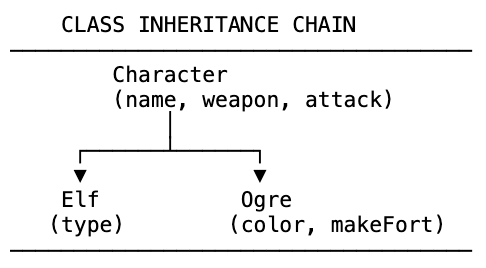
Crucially: JavaScript links the prototype chains rather than copying the properties. When doby.attack() is called, the engine walks up the chain to Character.prototype and runs the one attack function that lives there. It doesn’t duplicate it for every instance. Memory efficient.
This is different from languages like Java, where extends actually copies functionality into the subclass.
Private fields (ES2022)
A long-standing frustration with JavaScript OOP: no real private fields.
The old workaround was an underscore convention — _privateField — to signal “don’t touch this.” But it was just a hint. Nothing stopped you from accessing it.
ES2022 introduced the # prefix for genuinely private class fields and methods:
class Employee {
  #name = "Test"; // truly private — can't be accessed outside the class

  constructor(name) {
    this.#name = name;
  }

  getName() {
    return this.#name; // ok — accessing from inside the class
  }
}

const emp = new Employee("Dhaivick");
emp.getName(); // "Dhaivick"
emp.#name; // SyntaxError — private field
Private methods work the same way:
class Employee {
  #name = "";

  constructor(name) {
    this.#setName(name); // ok
  }

  #setName(name) {
    // private method
    this.#name = name;
  }
}
Anything prefixed with # is locked inside the class. Instances can’t access it. Other classes can’t access it. This is true encapsulation — the same principle we achieved with closures, but built directly into the class syntax.
OOP in the real world
Once you know OOP, you start seeing it everywhere.
Here’s class-based React (before hooks):
class Toggle extends React.Component {
  constructor(props) {
    super(props); // call React.Component's constructor
    this.state = { toggleOn: true };
    this.handleClick = this.handleClick.bind(this); // explicit binding
  }

  handleClick() {
    this.setState((state) => ({ toggleOn: !state.toggleOn }));
  }

  render() {
    return <button onClick={this.handleClick}>Toggle</button>;
  }
}
Toggle extends React.Component — inheriting setState, render, lifecycle hooks. The bind(this) on handleClick is the explicit binding pattern, ensuring this refers to the Toggle instance when the button is clicked, not the button element itself.
Understanding OOP makes third-party library code readable.
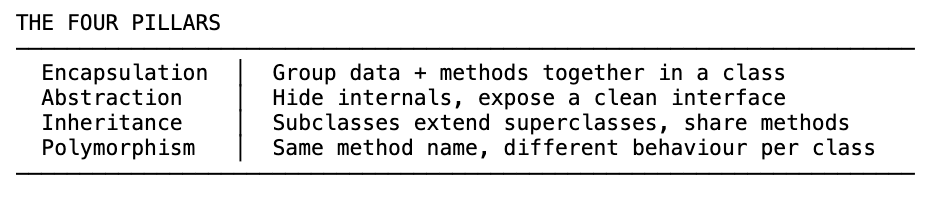
The four pillars of OOP
Everything we just built demonstrates these four foundational principles.
1. Encapsulation
Group related data and behaviour into a single unit. The Elf class keeps name, weapon, and attack together. Nothing leaks out accidentally. External code only touches what you expose.
Before OOP: scattered functions modifying global data with no structure. Encapsulation gives you a container.
2. Abstraction
Hide the complexity. Show a simple interface.
When you call new Elf("Doby", "cloth", "house elf"), you don’t care about the prototype chain being set up, this being bound, the prototype lookup for attack. The class hides all of that. You just get an elf.
Private fields (#) make abstraction even stronger — you explicitly choose what to expose.
3. Inheritance
Subclasses inherit from superclasses. Write shared behaviour once in Character. Elf and Ogre get it for free. Add a new character type — it inherits attack without you touching a line.
Memory efficient too: one attack function in Character.prototype, shared by every instance up the chain.
4. Polymorphism
Same method name, different behaviour per class.
class Elf extends Character {
  attack(cry) {
    return `attack with ${cry}`; // overrides Character's attack
  }
}

class Ogre extends Character {
  attack() {
    return "Argh!"; // its own version
  }
}

doby.attack("we"); // "attack with we"
shrek.attack(); // "Argh!"
Both have attack. You call it the same way. Each responds differently. That’s polymorphism — the ability to use the same interface across different types, each implementing it in their own way.
The short version
- OOP organises code by grouping state and behaviour into objects — modelling the real world
- Start with object literals → factory functions →
Object.create→ constructor functions → ES6 classes - The
newkeyword creates an object, setsthis, runs the constructor, returns the result - Methods go on the
prototype, not the constructor — so all instances share one copy in memory classsyntax is syntactic sugar over prototype inheritance — there are no “real” classes in JavaScriptextendssets up the prototype chain;supercalls the parent constructor- ES2022
#prefix gives you genuinely private class fields and methods - The four pillars: Encapsulation, Abstraction, Inheritance, Polymorphism