In Part 1, we looked at how the JavaScript engine works — the pipeline from source file to optimised machine code, the call stack, memory heap, garbage collection, and the runtime.
Now we go deeper.
This is where it gets interesting. These are the concepts that come up again and again in senior JavaScript interviews. They sound complicated. They’re not. Let’s break them down.
Execution context
Every time you call a function, the JavaScript engine creates something called an execution context.
Think of it as a little world that gets built the moment your function runs. The engine pushes it onto the call stack, runs the code inside, and pops it off when done.
Here’s a simple chain:
function sayMyName() {
  return findMyName();
}

function findMyName() {
  return printName();
}

function printName() {
  return "Dhaivick";
}

sayMyName();
When sayMyName() is called, an execution context is created and pushed onto the stack. Inside it, findMyName() is called — another execution context. Inside that, printName() — another one. Each gets popped off as it returns, until the stack is empty.
That’s execution context in action. Every function call, every time.
The global execution context
But here’s what most people miss.
Before any of your code runs, there’s already one execution context on the stack. It’s called the global execution context. You don’t create it. The engine creates it automatically.
And it gives you two things right away:
- A global object —
windowin the browser,globalin Node.js - The
thiskeyword — which at the global level equals that global object
Open a browser console. Create an empty JavaScript file. Before writing a single line, type this. You’ll get window. That’s the global execution context already running.
Any variable you declare at the top level gets attached to this global object:
var name = "Dhaivick";
console.log(window.name); // 'Dhaivick'
Creation phase and execution phase
The global execution context (and every function execution context) has two phases:
Creation phase — the engine scans your code before running it. It sets up the global object, the this keyword, and — importantly — it hoists variables and functions. More on that in a moment.
Execution phase — the engine runs your code line by line.
Understanding these two phases is the key to understanding hoisting.
Lexical environment
You’ve heard the word lexical before — Part 1 covered lexical analysis. Here it means the same thing: where the code is written.
A lexical environment is simply the environment that surrounds a piece of code — the world it lives in. Every time an execution context is created, a new lexical environment is created with it.
The key insight: in JavaScript, it’s not where a function is called that determines what it can access. It’s where it’s written.
function outer() {
  const x = 10;

  function inner() {
    console.log(x); // works — inner was written inside outer
  }

  inner();
}
inner can access x not because it’s called inside outer, but because it was written inside outer. That’s lexical scope. The compiler decides what’s accessible based on the structure of your code, before it even runs.
Hoisting
This one trips everyone up at some point.
During the creation phase, the JavaScript engine does something unusual. It scans your code for var declarations and function declarations, and allocates memory for them — before running a single line.
This is called hoisting.
Here’s what that means in practice:
console.log(teddy); // undefined — not an error
var teddy = "bear";

sing(); // works — function is fully hoisted
function sing() {
  console.log("oh la la");
}
teddy logs undefined because during the creation phase, the engine saw var teddy and allocated memory for it, but didn’t assign the value yet. The variable exists. The value doesn’t.
sing() works even before it’s defined in the code, because function declarations are fully hoisted — the entire function body gets stored in memory during the creation phase.
The difference between var and function declarations
varvariables are partially hoisted — the variable is created, but set toundefined- Function declarations are fully hoisted — the entire function is available immediately
letandconstare not hoisted this way — using them before their declaration throws a ReferenceError
console.log(a); // undefined
var a = 1;

console.log(b); // ReferenceError: Cannot access 'b' before initialization
let b = 2;
Function declarations vs function expressions
This distinction matters a lot with hoisting:
// Function declaration — hoisted fully
function greet() {
  return "hello";
}

// Function expression — not hoisted
const farewell = function () {
  return "goodbye";
};
A function declaration starts with the function keyword as the very first thing on the line. The engine sees it during the creation phase and stores the whole thing in memory.
A function expression is assigned to a variable. The variable gets hoisted (as undefined), but the function itself isn’t assigned until the execution phase reaches that line. Call it before then and you’ll get a TypeError.
Hoisting happens inside every execution context
Important: hoisting isn’t just a global thing. It happens inside every function that gets called.
var favouriteFood = "grapes";

var foodThoughts = function () {
  console.log("original:", favouriteFood); // undefined — not 'grapes'
  var favouriteFood = "sushi";
  console.log("new:", favouriteFood); // 'sushi'
};

foodThoughts();
The first log prints undefined. Why? Because when foodThoughts runs, the engine starts a new execution context for it. During that context’s creation phase, var favouriteFood inside the function gets hoisted and set to undefined. So when the first console.log runs, it finds undefined — not 'grapes' from the outer scope.
This is exactly why hoisting makes code unpredictable. The practical advice: avoid var. Use const and let. They don’t hoist the same way, which means you can’t accidentally use a variable before it’s been defined.
The arguments object
When you call a function, the engine creates a new execution context. Along with this, it also gives you something called the arguments object.
arguments is a built-in object that contains all the values passed into the function:
function marry(person1, person2) {
  console.log(arguments); // { 0: 'Tim', 1: 'Tina' }
  return `${person1} is now married to ${person2}`;
}

marry("Tim", "Tina");
It’s available automatically inside every function. You don’t have to declare it.
But here’s the catch: arguments looks like an array, but it isn’t one. You can’t use array methods on it directly. And as covered in Part 1, using arguments in certain ways prevents the compiler from optimising your function.
The modern approach: use rest parameters instead.
function marry2(...args) {
  console.log(args); // actual array: ['Tim', 'Tina']
  return `${args[0]} is now married to ${args[1]}`;
}
...args gives you a real array. Same data, no weird edge cases, no compiler headaches.
Global variable leakage and use strict
Here’s a specific JavaScript quirk that causes real bugs.
If you assign a value to a name without declaring it with var, let, or const, JavaScript doesn’t throw an error. Instead, it walks up the scope chain, reaches the global object, and creates the variable there.
function weird() {
  height = 50; // no var, let, or const
  return height;
}

weird();
console.log(height); // 50 — leaked into global scope
height was never declared inside weird. So JavaScript silently created it as a global variable. This is called global variable leakage, and it’s exactly the kind of unpredictable behaviour that makes code hard to debug.
The fix: add 'use strict' to the top of your file or function.
"use strict";

function weird() {
  height = 50; // ReferenceError: height is not defined
}
With use strict, JavaScript stops letting you get away with undeclared variables. It forces you to be explicit, which catches these mistakes at the point they happen instead of letting them silently corrupt your global state.
use strict was added specifically to prevent the edge cases that shouldn’t have been part of JavaScript in the first place. It’s a good habit to include it, though modern ES modules and class syntax enable strict mode automatically.
Variable environment
Each execution context has its own variable environment — a local space where that context’s variables live.
When the same variable name exists in multiple contexts, they don’t interfere with each other:
function one() {
  var isValid = true;
  two();
}

function two() {
  var isValid; // undefined — completely separate from one's isValid
}

var isValid = false;
one();
Three separate isValid variables. One in the global context, one in one’s context, one in two’s context. Each execution context keeps its own copy, and they’re completely isolated from each other.
When a function finishes, its execution context is popped off the stack and that variable environment is cleared from memory.
The scope chain
Each execution context doesn’t just have its own variable environment — it also has a link to its outer environment. That link is determined by where the function was written lexically.
This chain of links is called the scope chain.
When you reference a variable, JavaScript looks in the current context’s variable environment first. If it’s not there, it follows the scope chain link to the outer environment. If it’s not there either, it keeps going up the chain until it hits the global context. If it’s not found there, you get a ReferenceError.
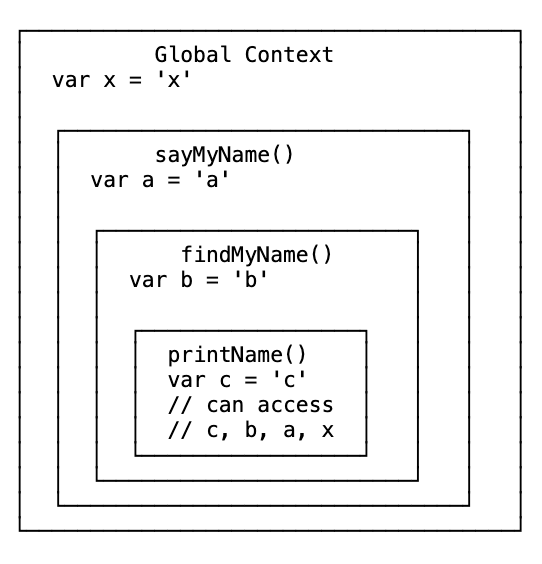
printName can access c (its own), b (findMyName’s), a (sayMyName’s), and x (global). The scope chain flows outward.
But go the other direction and it breaks. sayMyName cannot access c or b — those live deeper in the chain, not in its parent environments.
Scope is set at write time, not call time
This is the critical point. The scope chain is built by the compiler before the code runs, based on where functions are written. It doesn’t change based on where functions are called from.
That’s why JavaScript has lexical scope — also called static scope. You can look at the code and know exactly what each function has access to, without running it.
undefined vs ReferenceError
Two different things, easy to confuse:
undefined— the variable exists, but has no value assigned yetReferenceError— the variable doesn’t exist anywhere in the scope chain
var x;
console.log(x); // undefined — declared, not assigned

console.log(y); // ReferenceError — y was never declared
Function scope vs block scope
JavaScript has function scope by default. That means a new scope is only created when you create a new function — not for if blocks, for loops, or any other curly braces.
if (true) {
  var secret = "abc123";
}

console.log(secret); // 'abc123' — leaks out of the if block
With var, secret is accessible outside the if block because if doesn’t create a new scope. Only a function would.
ES6 introduced let and const, which give you block scope:
if (true) {
  let secret = "abc123";
}

console.log(secret); // ReferenceError — secret is block-scoped
Now secret is locked inside the {}. Any block — if, for, while, even a bare pair of curly braces — creates a new scope for let and const variables.
This is one of the main reasons modern JavaScript prefers let and const over var. Predictable scoping means fewer surprises.
Global namespace pollution
Here’s a problem that bites real applications.
Every variable you declare at the global level gets attached to the global object. As your application grows and you add more script files, all those globals end up in the same execution context. If two scripts use the same variable name, one will silently overwrite the other.
// script1.js
var user = "Alice";

// script2.js
var user = "Bob"; // silently overwrites the one above

console.log(user); // 'Bob' — Alice is gone
No error. No warning. Just wrong behaviour that’s hard to track down.
This is called polluting the global namespace. And it’s one of the main reasons why keeping variables out of global scope is considered good practice.
IIFE — the old-school solution
Before JavaScript had modules, developers solved the global pollution problem with a pattern called an IIFE — Immediately Invoked Function Expression.
It looks like this:
(function () {
  var privateData = "only available in here";
  // all your code
})();
Two parts: a function expression wrapped in parentheses, followed immediately by () to call it.
The outer parentheses prevent the engine from treating this as a function declaration. The trailing () calls it immediately. The function runs once, creates its own scope, and everything inside stays private.
// Without IIFE
var a = function () {
  return 5;
};
// some other script does this:
var a = function () {
  return "haha";
}; // overwrites yours

// With IIFE
var myModule = (function () {
  var a = function () {
    return 5;
  };
  return { a: a }; // only expose what you need
})();

myModule.a(); // 5 — safe, isolated
Libraries like jQuery used this pattern heavily. All their internal code stayed private inside the IIFE. Only the $ and jQuery names were exposed to the global scope — one global variable instead of hundreds.
You don’t see IIFEs as much today because JavaScript now has proper modules (import/export). But understanding them solidifies your understanding of scope, and you’ll still encounter them in older codebases.
this
Every execution context comes with the this keyword. But unlike everything else we’ve covered, this doesn’t follow lexical scope. It doesn’t care where the function is written. It only cares about how the function is called.
The rule: this is the object that the function is a property of. Practically — it’s whatever is to the left of the dot when the function is called.
const obj = {
  name: "Billy",
  sing() {
    console.log(this.name); // 'Billy' — this is obj
  },
};

obj.sing(); // obj is to the left of the dot
At the global level, this equals the global object — window in the browser. A regular function called without an object to its left is essentially window.functionName(), so this is window.
function greet() {
  console.log(this); // window
}

greet(); // same as window.greet()
The this gotcha — nested functions
Here’s where it gets messy. This is one of the most common sources of confusion in JavaScript.
const obj = {
  name: "Billy",
  sing() {
    console.log(this); // obj ✓

    const anotherFunction = function () {
      console.log(this); // window ✗ — not obj
    };

    anotherFunction();
  },
};

obj.sing();
sing is called on obj, so this is obj inside sing. But anotherFunction is called without any object to its left — it’s just anotherFunction(). So this defaults back to window.
This broke a lot of code before ES6. Two workarounds existed before arrow functions:
The self = this pattern:
const obj = {
  name: "Billy",
  sing() {
    const self = this; // capture this while it still refers to obj

    const anotherFunction = function () {
      console.log(self.name); // 'Billy' — uses captured reference
    };

    anotherFunction();
  },
};
Arrow functions (the modern fix):
Arrow functions don’t have their own this. They inherit this from the surrounding lexical context — the place where they were written.
const obj = {
  name: "Billy",
  sing() {
    console.log(this); // obj ✓

    const anotherFunction = () => {
      console.log(this); // obj ✓ — arrow function uses parent's this
    };

    anotherFunction();
  },
};
This is what people mean when they say “arrow functions are lexically bound.” They capture this from where they’re defined, not from how they’re called.
call, apply, and bind
These three methods let you manually control what this refers to when calling a function. They come up constantly in senior JavaScript interviews.
call
call invokes a function immediately, with a specific this value. Extra arguments are passed one by one.
const wizard = {
  name: "Merlin",
  health: 100,
  heal(num1, num2) {
    this.health += num1 + num2;
  },
};

const archer = {
  name: "Robin Hood",
  health: 30,
};

// Borrow wizard's heal method for archer
wizard.heal.call(archer, 50, 30);
console.log(archer.health); // 110
call(archer, 50, 30) says: run heal, but treat archer as this, and pass 50 and 30 as arguments. The archer’s health goes from 30 to 110.
apply
apply does exactly the same thing as call, with one difference: arguments are passed as an array instead of individually.
wizard.heal.apply(archer, [50, 30]);
That’s it. Use call when you know the arguments up front. Use apply when they’re already in an array.
bind
bind is different. It doesn’t call the function immediately. Instead, it returns a new function with this permanently set to whatever you provide.
const healArcher = wizard.heal.bind(archer);
healArcher(50, 30); // calls later, with archer as this
Use bind when you want to store a function with a specific this for later use — common in event handlers and callbacks.
Function currying with bind
There’s one more trick bind enables: currying — creating a specialised function by pre-filling some arguments.
function multiply(a, b) {
  return a * b;
}

const multiplyByTwo = multiply.bind(this, 2); // pre-fill first argument
const multiplyByTen = multiply.bind(this, 10);

multiplyByTwo(4); // 8
multiplyByTen(4); // 40
multiplyByTwo is a new function that always passes 2 as the first argument to multiply. You write the general function once and create specific versions from it. This pattern becomes very powerful in functional programming.
Why all of this matters
These aren’t academic concepts. They explain real bugs.
When you see a variable print undefined instead of its value — that’s hoisting. When a function can’t find a variable that seems like it should exist — that’s the scope chain. When two pieces of code silently overwrite each other — that’s global namespace pollution.
Understanding execution context means you can read JavaScript the way the engine reads it: creation phase first, execution phase second, scope chain built before anything runs.
That mental model changes how you write code. You stop relying on var. You understand why let and const behave the way they do. You know why functions can access certain variables and not others.
The engine isn’t doing magic. It’s following rules. Now you know the rules.