Let me ask you something.
When you write code in a file — do you know what happens next? How does the browser read it? How does JavaScript actually get executed?
Most developers write JavaScript every day and have no idea what’s happening underneath. That’s fine for most tasks. But once you understand what’s actually going on, you write better code. You debug faster. And things that felt like magic start making sense.
Let’s break it down.
First: your computer has no idea what JavaScript is
Seriously. CPUs only speak machine code — ones and zeros. JavaScript is just text sitting in a file. Hand that file to a CPU and it’ll look at you like you’re speaking a foreign language.
So how does any of this work?
That’s where the JavaScript engine comes in. Think of it as a translator. You write JavaScript, the engine reads it, and it figures out how to tell the computer what to do.
There are multiple engines out there — V8 (Chrome, Node.js), SpiderMonkey (Firefox), JavaScriptCore (Safari). They all do the same job, but they’re built differently and they compete on speed.
The big turning point was 2008. Google had a problem — Google Maps was slow. Directions, zoom, Street View — existing engines couldn’t handle it well. So Google built their own engine from scratch in C++. They called it V8. It was significantly faster than anything before it, and it changed the game for what JavaScript could do.
What’s happening inside the engine
When your JavaScript file enters the engine, it goes through a process.
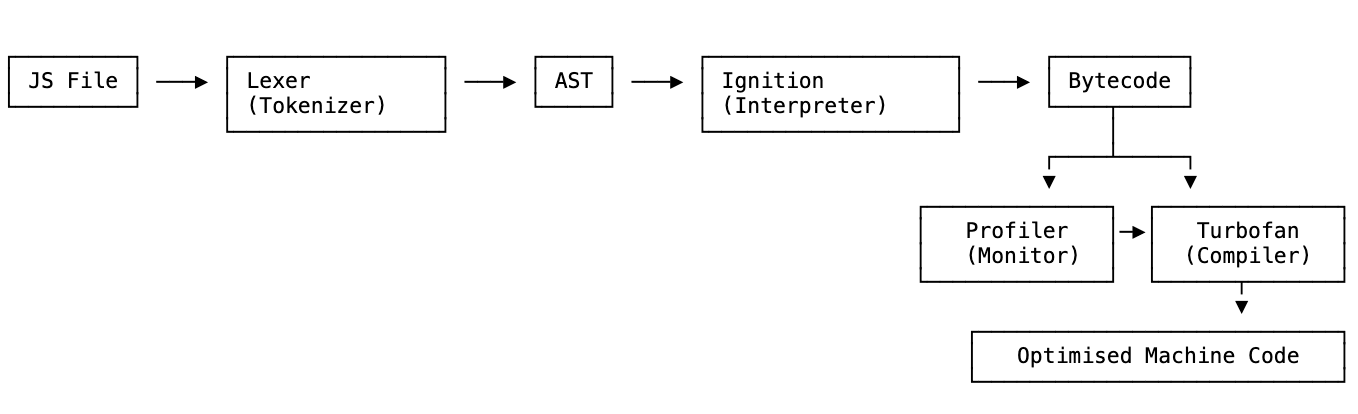
First: lexical analysis. The engine breaks your code down into the smallest meaningful units — tokens. Keywords, variable names, operators, all separated out.
Those tokens then get turned into an AST — Abstract Syntax Tree. This is a tree-like structure that represents the meaning of your code, not just the characters. It’s what lets the engine understand that const x = 5 is a variable declaration, not just a bunch of letters and symbols.
Once the AST is built, the real work starts. The code gets sent to an interpreter and a compiler.
The interpreter
An interpreter reads your code line by line and executes it immediately. No setup, no waiting. First line runs, second line runs, third line runs.
This is fast to get going — which is exactly why JavaScript originally used one. A file arrives from the server, you want it running as fast as possible. Interpretation makes that happen.
But there’s a problem. If you’ve got a loop that runs 1000 times, the interpreter translates the same code 1000 times. It doesn’t remember what it already figured out. That gets slow.
The compiler
A compiler takes a different approach. Instead of running code immediately, it reads the entire program first, analyses it, and rewrites it into a lower-level language — usually closer to machine code.
That first pass takes more time upfront. But the output is significantly faster. The compiler can spot things the interpreter can’t — like a function inside a loop that always returns the same result. Instead of calling that function repeatedly, the compiler can just replace it with the result directly.
Compilers you already use
This concept isn’t abstract — you’ve probably already worked with compilers without thinking of them that way.
Babel is a JavaScript compiler. You write modern JS (ES2020, ES2022) and Babel compiles it down to older JavaScript that every browser can understand. One language in, a different version of that language out. That’s a compiler.
TypeScript is a superset of JavaScript that compiles down to plain JavaScript. You write TypeScript, the compiler strips the types and outputs valid JS. Same idea.
Both of these do exactly what a compiler does: take one language and convert it into another.
JIT: the best of both
Modern engines don’t pick one. They use a JIT compiler — Just In Time.
In V8, here’s how it works: your code first goes to the interpreter (V8 calls it Ignition), which quickly produces bytecode and starts running it. Simultaneously, a profiler watches what’s happening — which functions get called often, what types of values are being passed around.
When the profiler spots something worth optimising, it hands that code to the compiler (Turbofan), which rewrites it as faster machine code. That optimised version replaces the bytecode going forward.
This is why JavaScript execution speeds up as your program runs. The engine is actively getting smarter in the background while your code is already executing.
Writing code the compiler can actually work with
Here’s what matters for you as a developer: the compiler can get confused. When it does, it de-optimises — throws away the compiled version and falls back to the interpreter. That’s slower than if it had never compiled at all.
There are a handful of things in JavaScript that are known to trip up the compiler. Most good developers avoid them instinctively, which is exactly why you don’t see them much in modern code:
eval()— executes a string as code at runtime. The compiler has no way to predict what it’ll do, so it can’t optimise anything around it.arguments— the implicit object available inside every function. Using it in certain ways makes the function unoptimisable. The fix: use named parameters or rest parameters (...args) instead.for...inon objects — iterating over an object withfor...incan confuse the compiler. PreferObject.keys()and iterate over that array.withstatement — changes the scope chain in a way the compiler can’t reason about statically. Rarely seen in modern code, but worth knowing why.delete— removing a property from an object changes its hidden class (more on that below), which breaks compiler optimisations.
The underlying principle: write predictable code. The compiler optimises what it can reason about. Anything that makes your code unpredictable at compile time makes it slower at runtime.
Inline caching. When you call the same function repeatedly with objects of the same structure, the compiler caches how to access the properties. Smart. But if the object structures keep changing between calls, that cache becomes useless. Keep your object shapes consistent.
Hidden classes. V8 internally assigns “hidden classes” to objects based on their shape — what properties they have, in what order. Two objects built the same way share a hidden class, and the compiler can treat them as the same thing. But add properties in different orders, or use delete to remove one, and V8 sees two different shapes and has to slow down.
// This is fine — both objects get the same hidden class
const obj1 = new Animal(1, 2);
obj1.a = 30;
obj1.b = 100;

const obj2 = new Animal(3, 4);
obj2.a = 30;
obj2.b = 100;

// This causes problems — different hidden class
const obj2 = new Animal(3, 4);
obj2.b = 100; // added b before a
obj2.a = 30;
The fix is simple: initialise all your object properties in the constructor, in the same order, every time.
Call stack and memory heap
To actually run your code, the engine needs two things: somewhere to store data, and somewhere to track what’s currently executing.
Memory heap is where your data lives. When you create a variable or an object, it gets allocated somewhere in the heap. Simple values often land on the stack, but complex data — objects, arrays, functions — lives here. Your variables are just pointers to spots in memory.
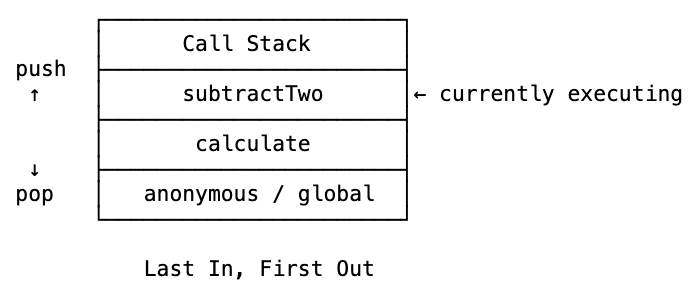
Call stack is where execution is tracked. Every time you call a function, it gets pushed onto the stack. When the function returns, it gets popped off. Whatever’s on top of the stack right now is where JavaScript currently is in your code.
function subtractTwo(num) {
  return num - 2;
}

function calculate() {
  const sumTotal = 4 + 5;
  return subtractTwo(sumTotal);
}

calculate();
Walk through it: calculate gets pushed on the stack. Inside calculate, we call subtractTwo — that gets pushed on top. subtractTwo finishes, gets popped off. Then calculate finishes, gets popped off. Stack is empty.
Last in, first out. That’s how the engine always knows exactly where it is in your program.
Stack overflow
What happens if you keep calling functions nested inside each other, forever?
function inception() {
  inception();
}

inception();
The stack just grows. And grows. And grows. Until:
Maximum call stack size exceeded.
Stack overflow. Named after the exact thing you just saw. The browser shuts it down before the tab crashes. (Older browsers would just freeze entirely.)
Recursion is the most common cause. There are valid uses for recursion — but always make sure there’s a base case that stops the chain.
Garbage collection and memory leaks
JavaScript automatically cleans up memory you’re no longer using. This is called garbage collection. The algorithm it uses is mark and sweep — trace everything reachable from your current execution context, mark it as needed, and sweep away everything else.
Sounds like you don’t have to think about memory at all, right?
That’s the trap.
Garbage collection gives developers a false sense of security. The collector is smart, but it can only clean up what it knows is no longer needed. If something still holds a reference to data — even accidentally — that memory is stuck.
Three common memory leaks:
Global variables. Anything in the global scope lives for the entire page session. Accumulate enough large objects there and memory just keeps climbing.
Event listeners you forget to remove. Attach a listener, navigate away, come back, attach another one. Do that repeatedly and you’ve got dozens of listeners stacking up in the background. This is especially bad in single-page apps.
setInterval never cleared. As long as an interval is running, everything it references stays in memory. The garbage collector won’t touch it. Forget to clearInterval, and that memory is locked until the page closes.
SoundCloud hit this in a real product. Their app ran on a gaming console in the background — sometimes for hours without the user touching it. A leak that would’ve been invisible on a normal browser session was a serious problem because the app just never stopped running.
JavaScript is single-threaded
One call stack. One thing at a time.
This made sense in 1995 when JavaScript was just handling button clicks and form validation. Not so convenient when you’re running a modern app that needs to fetch data, animate the UI, and respond to user input all at once.
Here’s what single-threaded really means in practice: open your browser console and run alert('hi'). Your entire page freezes. You can’t scroll. You can’t click. Nothing works until you dismiss the alert. That’s what blocking the one thread looks like.
So how does async code ever work?
The JavaScript runtime
Here’s the thing — when you use JavaScript in a browser, you’re not just using the JavaScript engine. You’re using the JavaScript runtime.
The runtime is the engine plus everything else the browser provides: Web APIs. Things like setTimeout, fetch, DOM event listeners, IndexedDB. These aren’t part of JavaScript itself. They come from the browser.
Here’s what happens when your code hits setTimeout:
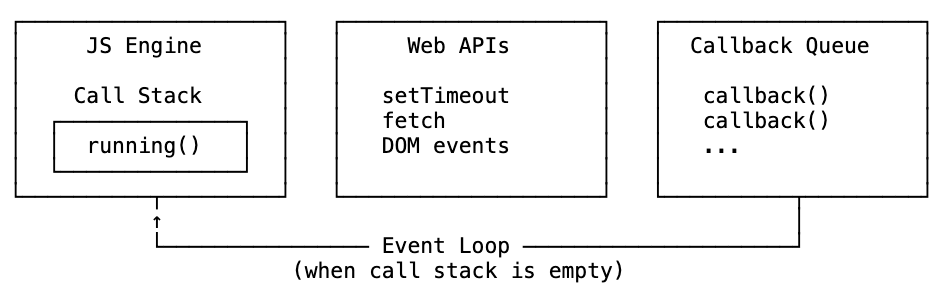
- The JS engine sees it and says — this isn’t mine. Hands it to the Web API.
- The Web API runs the timer in the background (in C++, not JavaScript).
- When the timer finishes, the callback goes into the callback queue.
- The event loop checks: is the call stack empty? Has the whole file run at least once? If yes — it pushes the callback onto the stack and it executes.
This is why this prints 1, 3, 2 — not 1, 2, 3:
console.log(1);

setTimeout(() => console.log(2), 1000);

console.log(3);
1 logs. setTimeout gets handed off to the Web API immediately — the engine doesn’t wait for it. 3 logs. Stack empties. One second later, 2 finally runs.
And here’s a common interview question: what if you set the delay to 0?
setTimeout(() => console.log(2), 0);
Still prints 1, 3, 2. Even at zero milliseconds, setTimeout goes through the Web API and callback queue. It still waits for the call stack to be fully empty. Zero delay doesn’t mean “right now” — it means “as soon as possible after everything else.”
So what is Node.js?
A language? No. An engine? Not exactly.
Node.js is a JavaScript runtime. A different one — built for the server instead of the browser.
Ryan Dahl built it in 2009 by taking the V8 engine and wrapping it in a C++ program that provides its own async layer called libuv, instead of browser Web APIs. The event loop works the same way. The callback queue works the same way. Single-threaded model — same.
What’s different is what libuv can do in the background. Browser Web APIs are sandboxed — for good reason, you don’t want random websites reading your file system. But Node’s libuv can access files, manage network connections, talk to databases, run as a server. That’s the whole point.
In Node you have global instead of window. But once you understand the runtime model, everything else clicks into place.
WebAssembly: what’s coming next
Here’s something worth keeping an eye on.
One of the limitations of JavaScript has always been that your code has to go through the entire engine pipeline — lexing, parsing, interpreting, JIT compiling — before it can actually run. That process is fast by now, but it’s still a process.
What if you could skip it entirely?
That’s the idea behind WebAssembly (Wasm). It’s a binary executable format that browsers can run directly — much closer to machine code than JavaScript ever is. You write code in another language (Rust, C++, Go), compile it down to WebAssembly, and the browser runs it without needing to interpret or JIT-compile anything.
The key thing that made this possible: all the major browsers finally agreed on a standard format. Back in 1995 when JavaScript was born, browsers were at war. Getting them to agree on a shared executable format wasn’t happening. Now it has.
What this means in practice: performance-heavy work — game engines, video editing, image processing, scientific computing — can run in the browser at near-native speed. Things that JavaScript simply couldn’t do fast enough before.
JavaScript isn’t going anywhere. It still runs the web. But WebAssembly fills in the gap for tasks where you need the absolute maximum out of the hardware. The two are designed to work alongside each other, not replace one another.
Why bother knowing all this?
Honestly, you can ship great software without knowing any of this. Plenty of people do.
But knowing it changes how you reason about problems.
When you see a memory leak, you know to look for what’s holding a reference. When async code doesn’t run in the order you expected, you can trace it through the event loop. When you’re writing a constructor, you think about property order. When something feels slow in a loop, you wonder if the compiler lost its hidden class.
The engine and runtime are doing a lot of invisible work every time your code runs. Understanding that work — even at a high level — makes you sharper at debugging and more intentional when writing.
And the next time someone tells you JavaScript is an interpreted language, you can tell them it’s more complicated than that. Modern engines compile. They optimise. They get smarter as your code runs.
That’s the foundation. Everything else builds on it.