Two concepts separate developers who use JavaScript from developers who truly understand it.
Closures. And prototypal inheritance.
Every senior JavaScript interview will test you on these. Every advanced pattern — modules, encapsulation, class-like structures — is built on top of them. Get these right and a lot of things that used to feel magical will start making complete sense.
Let’s go through both of them properly.
Functions are objects
Before closures and prototypes make sense, you need to accept one thing: functions in JavaScript are objects.
Not metaphorically. Literally.
When you define a function, the JavaScript engine creates a special type of object called a callable object. It has:
- A piece of code that can be invoked with
() - An optional
nameproperty - Properties you can add to it (because it’s an object)
- Built-in methods inherited from the prototype chain:
call,apply,bind
function woohoo() {
  console.log("we're here");
}

woohoo.yell = "ahh"; // you can add properties to a function

console.log(woohoo.name); // "woohoo"
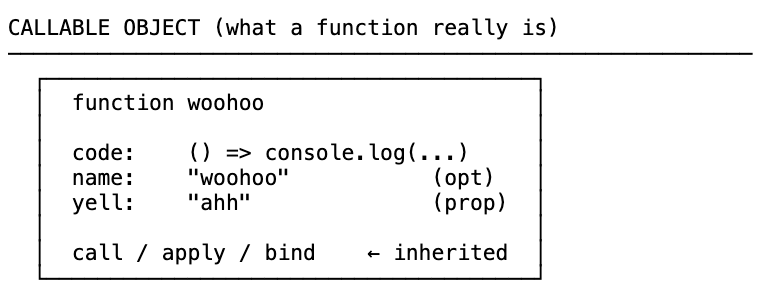
Because functions are objects, you can do things that most other languages don’t allow — pass them around like data, store them in variables, return them from other functions. That’s the foundation of everything we’re about to cover.
Four ways to invoke a function
You probably know two of these. Here are all four:
// 1. Direct function call
function one() {
  return 1;
}
one();

// 2. Method call (function inside an object)
const obj = {
  two() {
    return 2;
  },
};
obj.two(); // `this` refers to obj

// 3. Using call or apply
function three() {
  return 3;
}
three.call();

// 4. Function constructor (rare, but valid)
const four = new Function("num", "return num");
four(4); // 4
The function constructor creates a function from a string at runtime. You won’t see it often, but it’s there and it’s legal.
Functions as first-class citizens
When people say functions are “first-class citizens” in JavaScript, they mean three specific things:
1. You can assign them to variables or object properties:
const greet = function () {
  return "hello";
};
const obj = {
  greet: function () {
    return "hello";
  },
}; // now a method
2. You can pass them as arguments to other functions:
function a(fn) {
  fn();
}
a(function () {
  console.log("hi there");
});
3. You can return them from other functions:
function b() {
  return function c() {
    console.log("bye");
  };
}
b()(); // calls b, then immediately calls what b returns
Anything you can do with a string or a number, you can do with a function. That single property opens up a whole world — higher-order functions, closures, functional programming.
Function pitfalls
Two quick things to watch out for before we go deeper.
Don’t initialize functions inside loops. Every iteration creates a new function object in memory. Define the function once above the loop, then call it inside the loop.
// Bad — creates function 5 times
for (let i = 0; i < 5; i++) {
  function doWork() {
    /* ... */
  }
  doWork();
}

// Good — define once, call many
function doWork() {
  /* ... */
}
for (let i = 0; i < 5; i++) {
  doWork();
}
Use default parameters. If a caller doesn’t provide an argument, the parameter is undefined and you’ll get errors when you try to use it.
// Without default — will error if param is missing
function greet(name) {
  return name.toUpperCase();
}

// With default — safe
function greet(name = "stranger") {
  return name.toUpperCase();
}

greet(); // "STRANGER"
Higher-order functions
A higher-order function is one of two things:
- A function that accepts another function as an argument
- A function that returns another function
Why do you need this? Let’s walk through the evolution.
Level 1 — Hardcoded, not reusable:
function letAdamLogin() {
  // authentication logic...
  return "Access granted to Adam";
}
function letAvaLogin() {
  // same authentication logic, copy-pasted...
  return "Access granted to Ava";
}
Violates DRY. Every new user needs a new function.
Level 2 — Parameterised, more flexible:
function letUserLogin(user) {
  // authentication logic...
  return `Access granted to ${user}`;
}
letUserLogin("Adam");
letUserLogin("Ava");
Better — the data is flexible. But what if admins need stricter authentication than regular users?
Level 3 — Higher-order function, fully flexible:
function authenticate(verify) {
  // simulate work based on verify level
  let arr = [];
  for (let i = 0; i < verify; i++) arr.push(i);
  return true;
}

function letPerson(person, fn) {
  if (person.level === "admin") {
    fn(500000); // heavy verification
  } else {
    fn(100000); // lighter verification
  }
  return `Access granted to ${person.name}`;
}

letPerson({ level: "user", name: "Tim" }, authenticate);
letPerson({ level: "admin", name: "Sally" }, authenticate);
Now we can tell the function both what data to use and what to do at call time. That’s the superpower of higher-order functions.
Returning functions:
// Regular version
function multiplyBy(num1) {
  return function (num2) {
    return num1 * num2;
  };
}

// Arrow function version — same thing, cleaner
const multiplyBy = (num1) => (num2) => num1 * num2;

const multiplyByTwo = multiplyBy(2);
multiplyByTwo(4); // 8
multiplyByTwo(10); // 20

const multiplyByFive = multiplyBy(5);
multiplyByFive(6); // 30
multiplyBy is a higher-order function because it returns a function. And you can spin up new specialised versions of it on the fly.
Closures
Here’s the first pillar.
A closure is the combination of a function and the lexical environment in which it was declared.
Closures allow a function to access variables from its enclosing scope, even after that scope has left the call stack.
Let’s see it:
function a() {
  let grandpa = "grandpa";
  return function b() {
    let father = "father";
    return function c() {
      let son = "son";
      return `${grandpa} > ${father} > ${son}`;
    };
  };
}

a()()(); // "grandpa > father > son"
Here’s the question that makes closures interesting: function a ran and was popped off the call stack. Its variable environment — including grandpa — should have been garbage collected. So how does c still have access to grandpa?
The closure box:
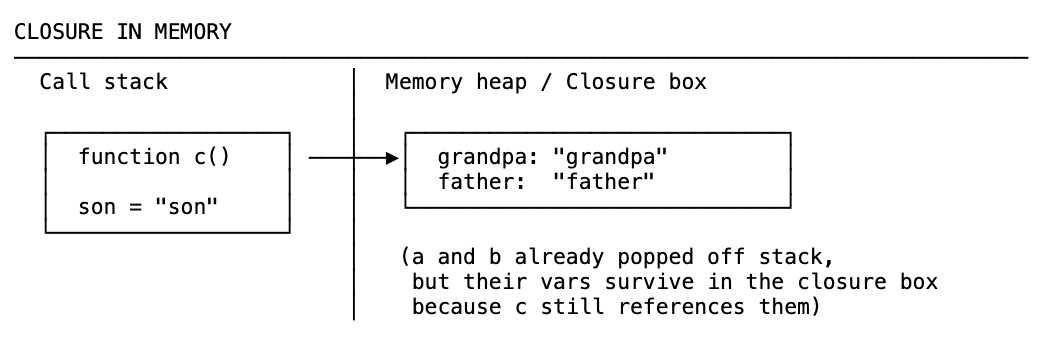
When a runs, its variable grandpa goes into the memory heap. When a is popped off the stack, the garbage collector comes along — but it sees that something inside still references grandpa. So it can’t clean it up. Same for father when b pops off.
When c finally runs and needs grandpa, it doesn’t look up the scope chain to global scope — it looks in the closure box.
This works because of two things we already know:
- Functions are first-class citizens (you can return them from other functions)
- JavaScript is lexically scoped — where you write a function determines what it has access to, not where you call it
Closures and the event loop:
This is why closures show up everywhere in async code:
function callMeMaybe() {
  const callMe = "hi, I am now here";
  setTimeout(function () {
    console.log(callMe); // still accessible even after callMeMaybe pops off the stack
  }, 4000);
}
callMeMaybe();
callMeMaybe runs and is done. Four seconds later, the callback fires. By that point callMeMaybe is long gone from the stack — but the callback still has access to callMe through the closure.
Why closures matter: two real benefits
1. Memory efficiency
Every time you call a function, you do all the work inside it. If that function does something expensive, you repeat that expense every call.
// Without closure — creates the big array every call
function heavyDuty(index) {
  const bigArray = new Array(7000).fill("😊");
  console.log("Created it");
  return bigArray[index];
}

heavyDuty(688); // Created it
heavyDuty(700); // Created it again
heavyDuty(800); // Created it again
With a closure, you create the expensive thing once and keep it in memory:
// With closure — creates the big array once
function heavyDuty2() {
  const bigArray = new Array(7000).fill("😊");
  console.log("Created it once");
  return function (index) {
    return bigArray[index];
  };
}

const getHeavyDuty = heavyDuty2(); // Created it once
getHeavyDuty(688); // just accesses existing array
getHeavyDuty(700); // same
getHeavyDuty(800); // same
The function returned from heavyDuty2 holds a reference to bigArray in its closure. The garbage collector can’t remove it. You create the array once and access it as many times as you need.
2. Encapsulation
Closures let you hide data. This is a security principle called least privilege — only expose what needs to be exposed.
const makeNuclearButton = () => {
  let timeWithoutDestruction = 0;

  const passTime = () => timeWithoutDestruction++;
  const launch = () => {
    timeWithoutDestruction = -1;
    return "BOOM";
  };

  setInterval(passTime, 1000);

  return {
    totalPeaceTime: () => timeWithoutDestruction,
    // launch is NOT returned — hidden from the outside world
  };
};

const ohNo = makeNuclearButton();
ohNo.totalPeaceTime(); // 0, 5, 12...
ohNo.launch; // undefined — can't access it
timeWithoutDestruction is sacred. Nothing outside can touch it. launch is too dangerous — so we don’t return it. The only public API is totalPeaceTime.
This is what encapsulation means: hiding the internals, exposing only what’s necessary.
Closure exercises
Run a function only once:
function initialize() {
  let called = 0;
  return function () {
    if (called > 0) return;
    console.log("View has been set");
    called++;
  };
}

const startOnce = initialize();
startOnce(); // "View has been set"
startOnce(); // nothing — called > 0
startOnce(); // nothing
The classic interview question — var in a loop:
const arr = [1, 2, 3, 4];

// Broken — prints 4 four times
for (var i = 0; i < arr.length; i++) {
  setTimeout(function () {
    console.log("I am at index " + i);
  }, 3000);
}
Why? var is function-scoped (or global here). By the time the callbacks fire, the loop is done and i is 4. All four callbacks share the same i.
Fix 1 — use let:
for (let i = 0; i < arr.length; i++) {
  setTimeout(function () {
    console.log("I am at index " + arr[i]);
  }, 3000);
}
let is block-scoped. Each iteration of the loop gets its own i in its own block scope. Closures over separate variables.
Fix 2 — use an IIFE (for environments without let):
for (var i = 0; i < arr.length; i++) {
  (function (closureI) {
    setTimeout(function () {
      console.log("I am at index " + arr[closureI]);
    }, 3000);
  })(i);
}
Each iteration creates a new function that immediately runs, capturing that iteration’s i as its own closureI parameter — a new closure every loop.
Prototypal inheritance
The second pillar.
Inheritance means an object getting access to the properties and methods of another object.
JavaScript does this through the prototype chain. Every object has a hidden link (__proto__) pointing up to its parent object. When you access a property the engine doesn’t find on the object itself, it walks up this chain automatically until it finds it or reaches the end.

That’s why [1, 2, 3].map(...) works. Your array doesn’t have map — Array.prototype does. The engine walks the chain and finds it there.
const arr = [];
arr.__proto__ === Array.prototype; // true
arr.__proto__.__proto__ === Object.prototype; // true
arr.__proto__.__proto__.__proto__; // null — end of the chain
The dragon and the lizard
Let’s make this concrete.
const dragon = {
  name: "Tanya",
  fire: true,
  fight() {
    return 5;
  },
  sing() {
    if (this.fire) return `I am ${this.name}, the breather of fire`;
  },
};

const lizard = {
  name: "Kiki",
  fight() {
    return 1;
  },
};
What if we want lizard to inherit from dragon?
lizard.__proto__ = dragon; // create the prototype chain

lizard.sing(); // "I am Kiki, the breather of fire" ← inherited from dragon
lizard.fire; // true ← inherited
lizard.fight(); // 1 ← own property, not inherited
When you call lizard.sing(), the engine looks in lizard — no sing. Walks up to dragon — found it. Runs it with this pointing to lizard.
hasOwnProperty:
for (let prop in lizard) {
  if (lizard.hasOwnProperty(prop)) {
    console.log(prop); // "name", "fight" — only lizard's own properties
  }
}
for...in loops over inherited properties too. hasOwnProperty filters to only what’s directly on the object.
One note: don’t use __proto__ directly in production code. It’s bad for performance. Use Object.create() instead.
Object.create() — the right way
const human = { mortal: true };

const socrates = Object.create(human);
socrates.age = 45;

console.log(socrates.age); // 45 — own property
console.log(socrates.mortal); // true — inherited from human

human.isPrototypeOf(socrates); // true
Object.create(human) creates a new object whose __proto__ points to human. Clean, explicit, no performance issues.
Why the prototype chain is memory-efficient
You might be wondering — why not just copy all the properties from dragon onto lizard directly?
Because that would mean every lizard object gets its own copy of fight, sing, fire in memory. Create a thousand lizards and you have a thousand copies of the same methods.
With prototype inheritance, there’s only one copy of sing on dragon. Every lizard that inherits from it points to the same place in memory. That’s why Array.prototype.map exists as one function shared by every single array in your program.
__proto__ vs prototype
This trips everyone up.
__proto__is a property on every object instance — it’s a pointer up the chain to the parent’s prototypeprototypeis a property on every function — it’s the object that will become the__proto__of anything created from that function
Only functions have prototype. Objects (instances) have __proto__.
function multiplyByFive(num) {
  return num * 5;
}

multiplyByFive.__proto__ === Function.prototype; // true
Function.prototype.__proto__ === Object.prototype; // true
Object.prototype.__proto__; // null — end of the chain
At the end of the chain is Object.prototype — the base object everything inherits from. Go one step above and you hit null.

Extending built-in prototypes
You can add methods to built-in prototypes — but you almost never should.
// Adding a lastYear() method to Date
Date.prototype.lastYear = function () {
  return this.getFullYear() - 1;
};

new Date("1900").lastYear(); // 1899
new Date().lastYear(); // current year minus 1
Note: this must be a regular function, not an arrow function. Arrow functions don’t bind their own this, so this.getFullYear() would break. Here we need this to be the Date instance that called the method.
You can even overwrite existing methods (but really, don’t):
Array.prototype.map = function () {
  const result = [];
  for (let i = 0; i < this.length; i++) {
    result.push(this[i] + "🗺️");
  }
  return result;
};

[1, 2, 3].map(); // ["1🗺️", "2🗺️", "3🗺️"]
That completely breaks every map() call in your codebase. Don’t touch built-in prototypes in production code. But understanding how it works explains why this.length and this[i] work — because this is the array that called the method.
The roots of JavaScript: Scheme and Java
Here’s the historical context that ties everything together.
When Brendan Eich created JavaScript in 1995, he was inspired by two languages:
Scheme — a language developed at MIT in the 1970s. It was one of the first languages to have closures, and it treated functions as first-class citizens. The functional programming model.
Java — the most popular language at the time. Everyone was using it. Java had classes, classical inheritance, the object-oriented model.
Brendan Eich loved the functional side of Scheme. But Netscape wanted something that looked like Java. So he took the functional core — closures, first-class functions — and wrapped it in prototype-based objects that could simulate classes.
The result: JavaScript became a multi-paradigm language. You can write it functionally or object-oriented or a mix of both. That’s not a weakness — it’s the thing that makes it uniquely flexible.
And now you know where the two pillars come from. Closures came from Scheme. Prototypal inheritance was JavaScript’s answer to Java’s classical inheritance.
The short version
- Functions are objects — callable objects with
call,apply,bindinherited fromFunction.prototype - Functions are first-class: assign to variables, pass as arguments, return from functions
- Higher-order functions accept or return other functions — they make code generic and DRY
- A closure is a function plus the lexical environment it was written in — it keeps variables alive in the heap even after their scope leaves the stack
- Closures give you memory efficiency (create once, reuse) and encapsulation (hide what shouldn’t be public)
- The prototype chain lets objects inherit properties from other objects without copying them
__proto__is an instance pointer up the chain;prototypeis a property on functions that becomes the__proto__of instances created from them- Use
Object.create()to set up inheritance safely — never assign__proto__directly - JavaScript is a multi-paradigm language because Brendan Eich blended Scheme’s functional model with Java’s OOP influence